
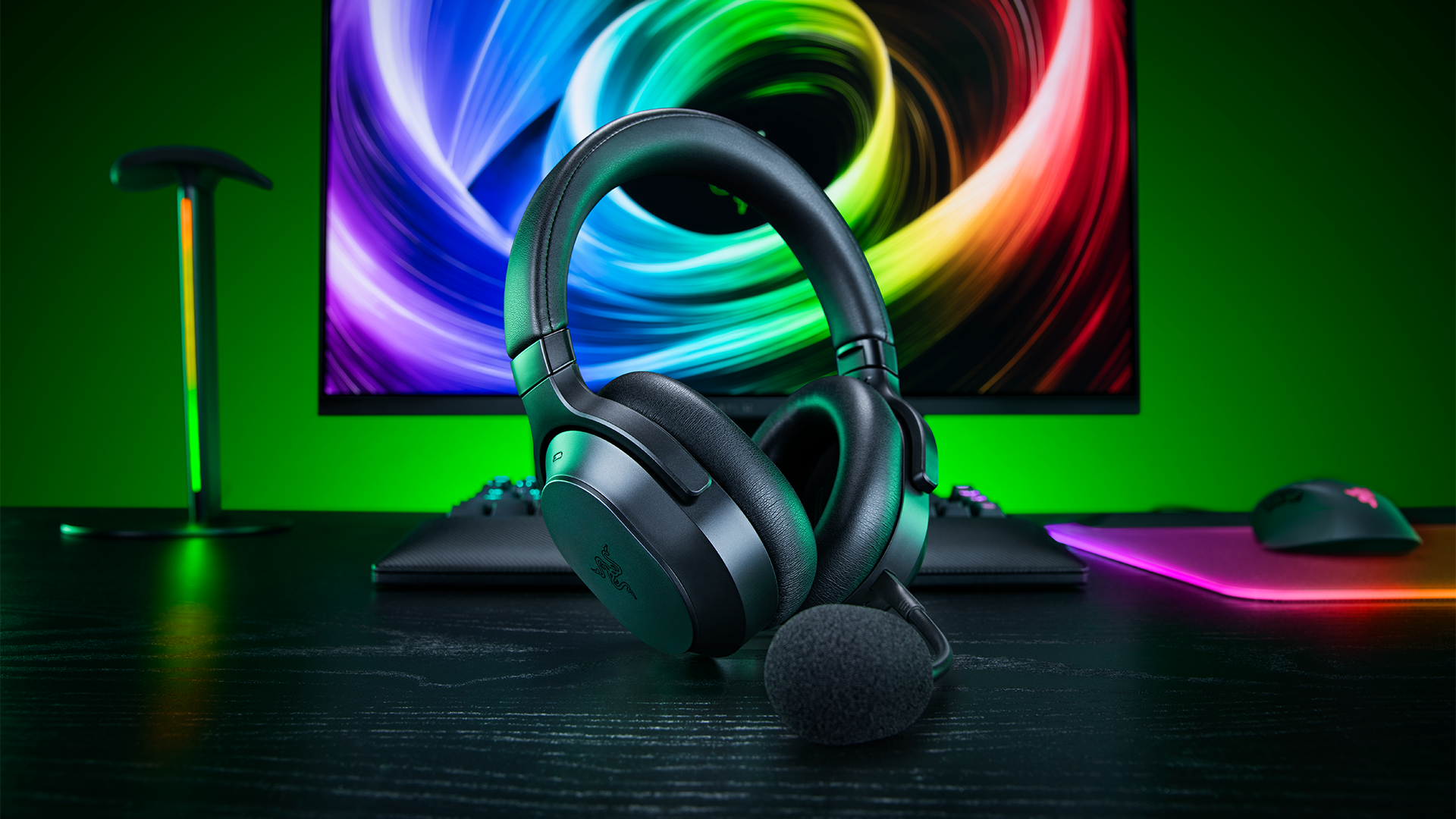

Razer has just unveiled the Barracuda V2 Pro, a phenomenal evolution of an already popular headset that transcends simply being ‘another gaming peripheral’ for your at-home sessions. It has all the bells and whistles you need for gaming at an expert level, but it also boasts daily use capabilities and an aesthetic that would fit at the gym, in the office, or on your commute.
I’ve been playing around with the Barracuda V2 Pro for a couple of weeks, and I’ve been pleasantly surprised throughout. This wireless headset supports every platform you could think of; it comes with ANC as standard, has ample battery life, and it’s extremely comfortable, which I can attest to even though I’m not a fan of the leatherette ear cups.
Let’s get into the full Razer Barracuda V2 Pro review.
Razer Barracuda V2 Pro Can Be Used Anywhere
If you want an all-singing, all-dancing headset that you can use for anything, anywhere, you’ll want to consider the Razer Barracuda V2 Pro. It’s a premium (that means expensive) wireless headset that does away with much of what makes Razer Razer. That means there’s no RGB, there’s no bulky, hard-wearing plastic, and there’s no serious gamer aesthetic.
It looks like a low-profile set of headphones that you’d take to the gym or wear on the train when going to work.
I mean it when I say low-profile, too. It weighs 285 grams, which is nuts. I use the BlackShark V3 Pro for gaming, and that’s a serious esports headset, weighing in at about 367 grams, so the difference is very noticeable. I’ve never been a fan of leatherette fixtures on headsets, but on the Barracuda V2 Pro, they work very nicely, and they contribute effortlessly to the lightness of the entire thing.
Like, I used the Barracuda V2 Pro while on a treadmill, and it stayed nicely on my head, even if the cups got a bit slick. You wipe them clean, and you’re off again. Perhaps that’s better than foamy, fabric cups, because they’d arguably absorb that fluid.
The order of the day with the Barracuda V2 Pro is comfort and capability. You barely feel it when you’re wearing it; the ear cups form perfectly around your ears (and I have big ears), and the connectivity effort is off the charts. You want to Bluetooth it to your phone? No problem. You want to use 2.4 GHz on a laptop or desktop? Absolutely.
And the convenience runs wild. You can connect the Barracuda V2 Pro to your phone via Bluetooth while also connecting to a gaming device via the 2.4 GHz connection, allowing you to use both inputs concurrently. You can sit there and play video games on your sofa while taking a call without skipping a beat.
Oh, and that reminds me – the headset has removable covers on the side of the cups that allow for a) customization and b) the storage of a dongle, which means you can never really lose it.
In terms of what’s under the hood, you might notice a somewhat major change between the Pro and the V2 Pro. The first iteration has 50 mm drivers, while the V2 Pro has 40 mm drivers. But that doesn’t reflect in worse performance, not one bit.
The Barracuda V2 Pro uses Razer’s TriForce Bio-Cellulose 40 mm drivers, which are incredibly versatile. Bear in mind that these are to be used for music and movies on the go as much as for gaming (also on the go, if you want). That said, the range is genuinely impressive, even when turned up loud. The latency, regardless of what connection type you use, is also minuscule, and that’s because of Razer’s HyperSpeed tech.
You get the best sound profile when you connect to a PC or a laptop, as this allows you to enable THX Spatial, which comes with virtual surround sound technology, courtesy of Razer’s proprietary software.
If you’re a talker, you’ll be happy to know that the Barracuda V2 Pro comes with not one but two microphone-based solutions. If you’re more of a hardcore gamer who needs squad comms, you can use the detachable boom mic. If you’re more low-key and want to keep things less overt, you can use the internal beamforming microphones with noise cancellation technology to chat as you travel.
Before I landed on the Razer Barracuda V2 Pro, my daily ‘travel’ headset was a combination of the Skullcandy Method 360 ANC earbuds and the Skullcandy Crusher PLYR 720, an open-back haptic-bass headset that provides ‘sensory’ feedback.
But, reflecting on that, the PLYR 720 is capable but weighs almost 360 grams and is an inherently bulky thing that maxes out at around 35 hours of battery life. The ANC earbuds are also great, but they’re not great for sustained wear, like you might do on a plane or a train. Therefore, I’m made whole by the arrival of the Barracuda V2 Pro, which takes both of those audio solutions and casts them out the window.
With the Barracuda V2 Pro, I get ANC technology, up to 70 hours of battery life, something that can be used on multiple devices, and something that is feather-light and fits much easier anywhere because a) it folds in on itself, and b) it’s slim.
That, and it’s totally inoffensive. The Skullcandy headset I was rocking has red ambient lights, literal skull-style branding, and metal grilles on the side of the earcups. The Barracuda V2 Pro is sleek, slim, black-on-black, and attractive.
Also, the Skullcandy Crusher PLYR 720 will run you up a bill of around $269.99, while the Razer Barracuda V2 Pro costs $199.99 at launch.
Ultimately, to bring this Barracuda V2 Pro review to a close, I’d like to happily recommend this device to anyone seeking a new multi-faceted, multi-format headset. It works for gaming as much as for traveling; it’s durable, has impeccable audio quality, and beats most competitors when it comes to overall connectivity, portability, and customization.
In my eyes, it’s faultless.
Let us know on the Insider Gaming Discord server if the Razer Barracuda V2 Pro sounds like your kind of headset.
For more Insider Gaming coverage, check out our review of the Razer Basilisk V4 Pro, and don’t forget to sign up for our newsletter

Grant has been gaming for 30+ years and in the industry for 10+. You'll probably find him playing a post-apocalyptic game or an extraction shooter somewhere.
More from Grant Taylor-Hill