

New settings on Twitch have caused a stir after it was revealed that Amazon would be using content on the platform to train AI, and users must opt out of the setting to be excluded.
Twitch users have spoken in outrage regarding the latest reveals, particularly as there is some uncertainty about how users’ content is used to train AI, and what exactly it entails.
As such, the majority of Twitch users are pushing for others to opt out of the setting, and Insider Gaming has the details on how to do so.
How to Opt Out of AI Training on Twitch
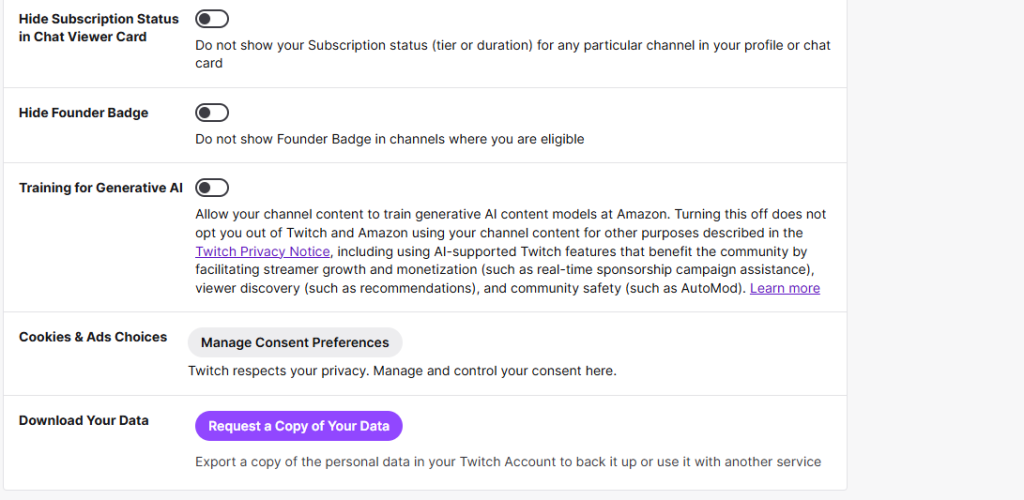
To opt out of Amazon’s AI training on Twitch, users must alter their settings, specifically the security settings.
While it’s a relatively simple process, the introduction of the feature and the specified setting has attracted plenty of criticism.
If you want to toggle the settings for Amazon’s AI training on Twitch, follow these steps:
- Head to Twitch and sign in to your account.
- Open the settings menu.
- Select the ‘Security and Privacy’ option.
- Scroll down to the bottom of the page and find the ‘Training for Generative AI’ option.
- Click the toggle to turn the setting off.
Is Opt-Out Automatically Enabled on Twitch?
No, opt-out is not automatically enabled on Twitch’s setting regarding AI training and must be manually turned off by users.
The setting’s status as being on automatically has raised significant questions, as it’s unclear whether content is scraped for AI training before you turn it off, and whether turning it off retrospectively removes content from training.
Twitch itself has been relatively unclear on the matter, with one Twitch boss even admitting he was unsure if VODs have already been used to train Amazon’s AI.
The situation may change in the future, considering the vast amount of backlash being directed at the platform, but for now, you’ll need to toggle the setting to opt-out.
What are your thoughts on Amazon using Twitch content to train AI? Let us know in our official Discord server.
For more, check out XBOX CEO Asha Sharma’s stance on “bad AI” in gaming. Also, don’t forget to sign up for our weekly newsletter.