






Once upon a time, an XBOX user received a one-year ban for snapping smut in Baldur’s Gate 3 and ‘accidentally’ uploading the content to the XBOX Network, inadvertently breaching the platform’s terms of service. Even after a review, XBOX upheld the enforcement action, stating that sharing the nudity in clips on the XBOX Network was purely and simply breaking the rules.
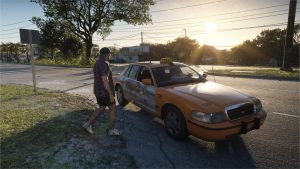
Fast forward to right now, and some users on social media are reporting a similar thing happening with Grand Theft Auto 6. In a series of posts, we’ve seen users complaining about temporary XBOX bans being handed out for sharing lewd images to the network that they’ve captured in GTA 6, which is rife with nudity.
Will Nude Pictures Get You Banned in GTA 6?
On Reddit, users have been discussing bans for auto-uploaded content on XBOX snapped in GTA 6. They’re staring down temporary bans for sharing clips, some of which don’t even contain explicit nudity.
In the original post in one thread, a user said they were handed a two-day suspension they couldn’t appeal shortly after uploading a clip showing NPCs in swimsuits on Vice City beach.
Comments under the clip revealed that some folks had experienced the same thing in GTA 6 and other games. There were reports of games that we already knew about, such as The Witcher 3, Cyberpunk 2077, and, as mentioned, Baldur’s Gate, causing this problem.
Unfortunately, the same users were quick to point out how it’s too ‘easy’ to accidentally hit the screenshot button on XBOX, given where it sits on the controller.
For now, you’re probably best trying to play it safe. Either that, or don’t snap lewd pictures and videos in GTA 6.
How to Disable Auto Upload on XBOX
If you want to disable the auto-uploading of clips and screenshots to the XBOX Network, you can do so in a matter of seconds.
- Switch on your console
- Navigate to Settings
- Head to Preferences, then Capture & Share
- Find ‘Automatically Upload’ and switch it to ‘Don’t Upload’
That’s all you need to do to keep that smut away from the XBOX Network and hopefully protect yourself from a two-day XBOX ban.
If you need to know anything else about Grand Theft Auto 6, make sure you stop by our full guides hub. It contains everything you could need to learn about the most important game release of all time!
Also, you can buy Grand Theft Auto 6 here if you haven’t already!
Let us know if you’re enjoying GTA 6 on the Insider Gaming Discord server.
For more Insider Gaming coverage, check out all the cheat codes for GTA 6, and don’t forget to sign up for our free weekly newsletter

Grant has been gaming for 30+ years and in the industry for 10+. You'll probably find him playing a post-apocalyptic game or an extraction shooter somewhere.
More from Grant Taylor-Hill


Comments