






Rockstar has spent the last decade putting together GTA 6. Now, there are no more leaks, no more delays, and all that’s left is to play Grand Theft Auto 6. However, there will be plenty of people out there ready to post GTA 6 spoilers.
Ah, spoilers. The concepts have been around for decades, with people flooding out of the theater after seeing Star Wars: The Empire Strikes Back and telling people in line that Darth Vader was Luke Skywalker’s father. Now, in 2026, with the most interconnected world ever, Grand Theft Auto 6‘s secrets and story will be harder to escape.
Also, you can buy Grand Theft Auto 6 here, if you haven’t already!
Best Words to Mute to Avoid GTA 6 Spoilers
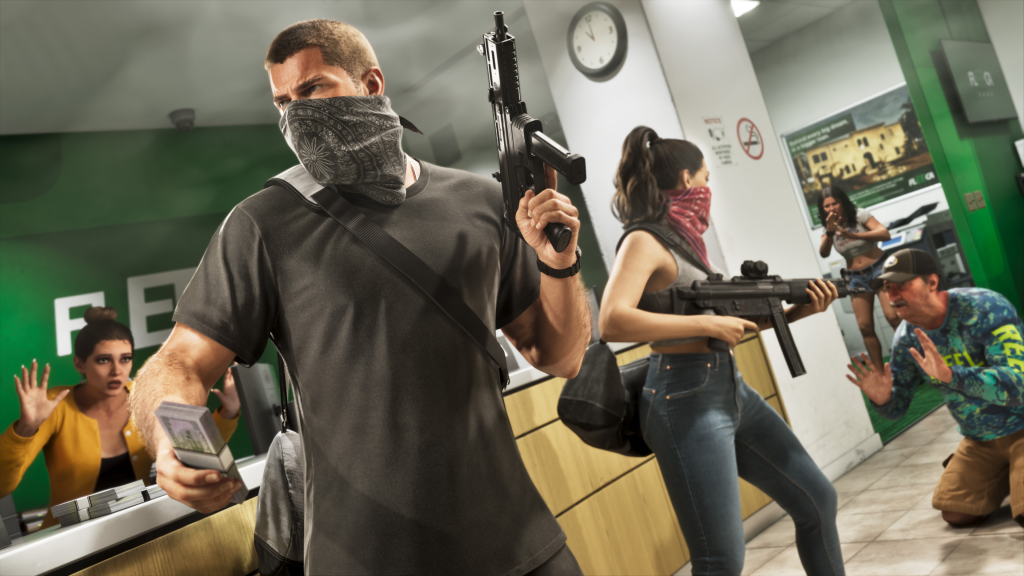
Some of the best GTA 6 keywords to mute across social media include anything related to the ending, potential character deaths, mission spoilers, and anything related.
The main concern for GTA 6 is obviously the story. It’s the kind of narrative and event you can only experience for the first time once. As we’ve learned with Rockstar Games, its storytelling is never straightforward.
- More Insider Gaming: GTA 6 Datamine Reveals Possible 120Hz Mode, But No VRR Support
Here’s a long list of words and phrases you should actively avoid or mute for anywhere from a week to a month following GTA 6’s release:
- GTA VI Ending / GTA 6 Ending
- GTA VI Endings / GTA 6 Endings
- GTA VI Story / GTA 6 Story
- GTA VI Story Spoilers / GTA 6 Story Spoilers
- GTA VI Plot / GTA 6 Plot
- GTA VI Plot Twist / GTA 6 Plot Twist
- GTA VI Mission / GTA 6 Mission
- GTA VI Missions / GTA 6 Missions
- GTA VI Final Mission / GTA 6 Final Mission
- GTA VI Last Mission / GTA 6 Last Mission
- GTA VI Alternate Ending / GTA 6 Alternate Ending
- GTA VI All Endings / GTA 6 All Endings
- GTA VI Ending Explained / GTA 6 Ending Explained
- GTA VI Secret Ending / GTA 6 Secret Ending
- GTA VI Credit / GTA 6 Credit
- GTA VI Credits / GTA 6 Credits
- GTA VI Leak / GTA 6 Leak
- GTA VI Leaks / GTA 6 Leaks
- GTA VI Story Leak / GTA 6 Story Leak
- GTA VI Story Leaks / GTA 6 Story Leaks
- GTA VI Final / GTA 6 Final
- GTA VI Final Cutscene / GTA 6 Final Cutscene
- GTA VI Final Scene / GTA 6 Final Scene
- GTA VI Death / GTA 6 Death
- GTA VI Death Scene / GTA 6 Death Scene
- GTA VI Death Cutscene / GTA 6 Death Cutscene
- GTA VI Betrayal / GTA 6 Betrayal
- GTA VI Jason / GTA 6 Jason / Jason
- GTA VI Jason Betrayal / GTA 6 Jason Betrayal / Jason Betrayal
- GTA VI Jason Death / GTA 6 Jason Death / Jason Death
- GTA VI Jason Dies / GTA 6 Jason Dies / Jason Dies
- GTA VI Jason Kill / GTA 6 Jason Kill / Jason Kill
- GTA VI Jason Killed / GTA 6 Jason Killed / Jason Killed
- GTA VI Lucia / GTA 6 Lucia / Lucia
- GTA VI Lucia Betrayal / GTA 6 Lucia Betrayal / Lucia Betrayal
- GTA VI Lucia Death / GTA 6 Lucia Death / Lucia Death
- GTA VI Lucia Dies / GTA 6 Lucia Dies / Lucia Dies
- GTA VI Lucia Kill / GTA 6 Lucia Kill / Lucia Kill
- GTA VI Lucia Killed / GTA 6 Lucia Killed / Lucia Killed
- Ending
- Ending Leaked
- Ending Explained
- Endings
- Jason and Lucia Ending / Jason & Lucia Ending
- Secret Ending
- GTA VI Secret Ending / GTA 6 Secret Ending
- True Ending
- GTA VI True Ending / GTA 6 True Ending
- Who Dies / Who Dies in GTA 6
How to Mute Words on Twitter (X) For GTA 6
You must go into the Settings on your X account, find the mute function in your privacy settings, and manually enter words that X needs to ignore, which is the case for GTA 6 spoilers.
Follow these instructions to do this:
- Go to X (formerly Twitter)
- Log in to your account.
- Click on Notifications on the left bar.
- Press on the mini gear icon toward the top of the middle of the page.
- Choose Privacy and Safety.
- Click on Mute and block.
- Select Muted Words.
- Press on the mini-plus icon to the right of where it says Muted words.
- Input the word or phrase you want muted in the bar.
- Handpick which Mute from and Duration settings and parameters you feel work best for you.
- Click Save once you’re done.
- Rinse and repeat the steps to mute more words.
My own personal piece of advice is to avoid YouTube as best as you can as well, or make sure you’re only searching for your favourite content creators who won’t spoil the game, avoid the comments, and don’t go on the home page or anything related, as people will blatantly pull spoilers in thumbnails and titles.
- More Insider Gaming: GTA 6 Main Menu Theme Revealed as Preloads Start
Rockstar might DMCA GTA 6 spoilers after Launch, yes, but they can’t catch everyone, and can’t catch videos the second they go up.
Have you got any other methods you’re going to use to avoid spoilers? Let us know your thoughts via the free Insider Gaming Discord server.
For more Insider Gaming content, read ‘Two New PS Plus Titles Announced Ahead Of Schedule.’ Don’t forget to sign up for our free weekly newsletter.
NOTE: Insider Gaming may earn affiliate commission if you purchase items through links on Insider Gaming. Read more about affiliate commission here.

Andy is Insider Gaming's Senior Evergreen Editor and has been in the games journalism sphere in one way or another for over 7 years. His video game taste is as…
More from Andrew Highton



Comments