






For those who aren’t aware, you can listen to GTA 6’s music on the radio not just while driving but on foot too, and here’s a guide on how to do it.
Rockstar has gone above and beyond with the amount of music they offer in Grand Theft Auto 6, with some of the world’s most renowned artists and tracks rotating on the radio. The developers didn’t want this experience limited to being in a vehicle, and the latest title lets you listen to music wherever you are through the radio stations.
You can also buy Grand Theft Auto 6 here if you haven’t already!
GTA 6 Headphone/Earpods Location

To listen to music while walking in GTA 6, you need to purchase a pair of headphones at an Electronics Shop.
With all the realism you see across GTA 6, the same extends to the music. To play music while walking in the game, players will have to equip their characters with earpods or headphones, which are found in ‘Electronics’ shops. These shops are marked with a ‘Headphone’ icon on the map, and they also sell phone covers.
- More Insider Gaming: How to Find & Complete Tractor Revenge Encounter in GTA 6
Check out the screenshot below to see what the icon looks like, along with the location of an Electronics shop in Vice City.
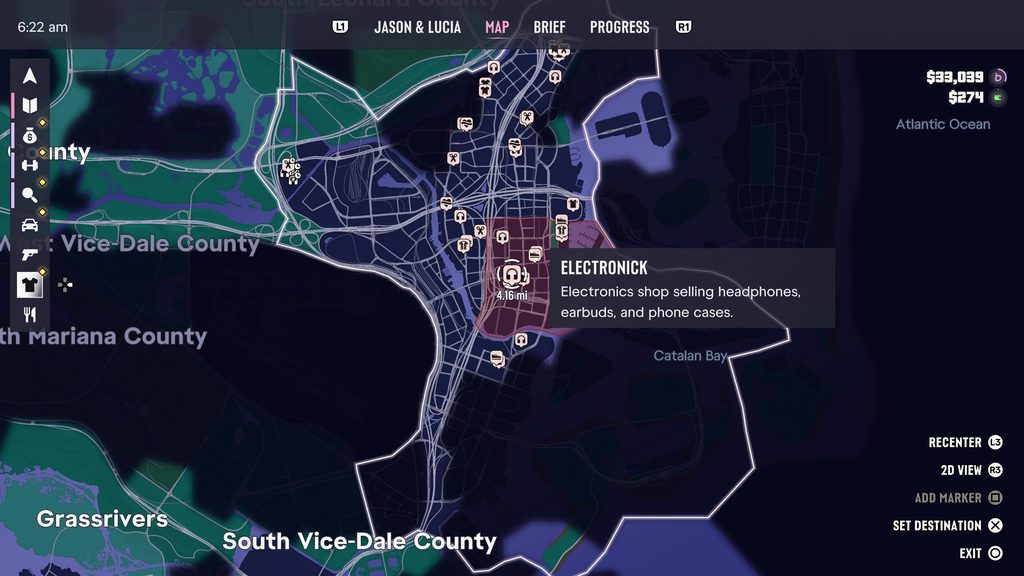
How to Listen to Music While Walking in GTA 6
Listening to music is similar to how you play music in cars in GTA 6, but you need to put on headphones.
Once players enter the shop, they can buy either a pair of earpods (which look like the AirPods Pro) in a variety of colors or a pair of headphones that look like a set of Beats. There aren’t any different variants other than these; the only other customization is the different color options you can swap around.
- More Insider Gaming: All GTA 6 Guides, Walkthroughs, Best Tips & Tricks
Follow the steps below to learn how to play music through the radio while walking in GTA 6.
- After purchasing, hold L1/LB to open the weapon wheel, then press R1/RB to open the item wheel.
- From the top-left option, you can equip or unequip your headphones.
- To start playing music, similar to driving, press and hold the D-Pad Left button to open the Radio and On-Demand menu.
- That’s about it; now you can go around listening to music through the radio or podcasts in GTA 6.
Here’s a video walkthrough of how listening to music while walking works in GTA 6:
Are you going to listen to music while walking in GTA 6? Leave your thoughts down in the comments, and join the official Insider Gaming Discord server.
For more from Insider Gaming, read about where to find the Piccia Dragon Gate Furia in GTA 6. Don’t forget to sign up for our weekly newsletter.
NOTE: Insider Gaming may earn affiliate commission if you purchase items through links on Insider Gaming. Read more about affiliate commission here.






Comments