






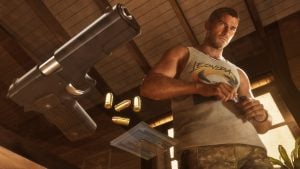
Grand Theft Auto 6 features an extensive array of weapons. From rifles and pistols to shotguns and melee weapons, you’ll have more than you care to handle in this game. This time around, how you use them, equip them, and store them is different, with Rockstar Games having taken inspiration from Red Dead Redemption 2.
In this guide, we’ll walk through the various weapon types in GTA 6, talk about how to buy more weapons, and figure out where you store them and how you access them in the game.
All GTA 6 Weapon Types, Explained
You’ll see that there are three core weapon types in GTA 6, indicated by a different icon:
- Owned Weapons – Indicated by a light blue handgun icon
- Unowned Weapons – Indicated by a white handgun icon
- Unique Weapons – Indicated by a yellow/gold handgun icon
Let’s break that down further.
Owned Weapons in GTA 6
When you own a weapon in GTA 6, it means you’ve purchased it from an Ammu-Nation store. When you buy that weapon, both Jason and Lucia will be able to access it, but modifications and when you equip that weapon are unique to each character.
If you drop or lose an owned weapon, you can recover it from the trunk of your owned car (indicated by a light blue car icon) or from a weapon locker. The easiest place to find a weapon locker is in any Ammu-Nation store in Leonida.
As you purchase more weapons at Ammu-Nation, you’ll unlock more products, such as attachments.
Unowned Weapons in GTA 6
Unowned weapons are what they sound like; they’re weapons that you use temporarily that aren’t exactly yours. You might pick them up from a fallen enemy or find one hidden in a corner somewhere. They cannot be owned or modified, and once they’re out of ammunition, you’ll probably just discard them.
You can store unowned weapons in the trunk of an owned car, but, again, that’s a temporary solution.
Unique Weapons in GTA 6
As you explore Leonida, you’ll come across bespoke weapons that are considered one-of-a-kind. You can’t modify these weapons, but once you pick them up, both characters will have access to them. You can access a weapon locker to switch between standard and alternate variants of many weapons in the game.
This also includes the variants you receive for weapons unlocked via the Ultimate Edition or the game’s pre-order bonuses.
How to Buy New Weapons in GTA 6
If you want to legally acquire weapons in GTA 6 and unlock them as owned guns, you’ll need to head to Ammu-Nation. These firearm-themed superstores are where you’ll find and customize all your weapons.
Fortunately, Ammu-Nation operates a nice loyalty scheme. If you buy more, they’ll unlock more for you to purchase. Put simply, the more money you spend at Ammu-Nation, the larger your arsenal will become.
Also, the size and nature of the Ammu-Nation you visit will determine the stock they have on hand. The largest Ammu-Nation stores will have more customization options and a larger repository of weapons than a smaller store.
Ammu-Nation stores will also sell you plenty of ammunition, body armor, and packs of explosives. When you purchase these items, you’ll see that they’re automatically transported to the trunk of your owned car.
How to Modify Weapons in GTA 6
If you want to modify any weapon in GTA 6, you’ll need to head to your local Ammu-Nation. Once there, you’ll be able to customize your gun’s grips, magazines, optics, muzzle attachments, and tactical attachments, amongst other things.
Some attachments are dynamic and can be adjusted on the go. For instance, suppressors and flashlights can be removed while you’re out exploring the world, but other, more permanent attachments must be removed at an Ammu-Nation.
If you need to know anything else about Grand Theft Auto 6, make sure you stop by our full guides hub. It contains everything you could need to learn about the most important game release of all time!
Also, you can buy Grand Theft Auto 6 here if you haven’t already!
Let us know if you’re enjoying GTA 6 on the Insider Gaming Discord server.
For more Insider Gaming coverage, check out all the cheat codes for GTA 6, and don’t forget to sign up for our free weekly newsletter

Grant has been gaming for 30+ years and in the industry for 10+. You'll probably find him playing a post-apocalyptic game or an extraction shooter somewhere.
More from Grant Taylor-Hill



Comments