






Rockstar Games made a big deal out of Grand Theft Auto 6‘s dynamic weather system in the lead-up to launch, showcasing everything from thick rolling fog and violent thunderstorms to full-blown hurricanes. Naturally, many players were eager to experience these impressive weather effects for themselves. However, since launch, plenty have noticed that Leonida seems to be stuck with sunny skies day after day.
As it turns out, this might not be entirely intentional, with a potential weather-related bug preventing conditions from changing as they should. Rockstar has already released its first notable post-launch update, which was intended to address the issue, but numerous players are still experiencing the same problem.
Thankfully, there appears to be a manual workaround that can get the weather changing again. If you’re tired of endless sunshine in Vice City, here’s how to fix the weather bug in GTA 6.
You can buy Grand Theft Auto 6 here if you haven’t already!
How To Fix Weather Bug In GTA 6 On PlayStation 5
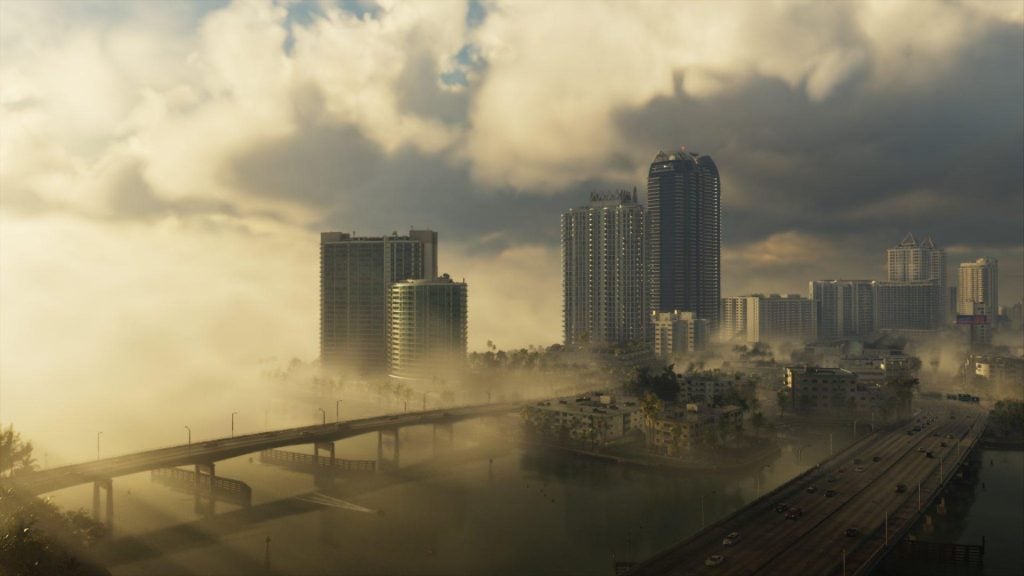
Clearing your PlayStation 5’s system cache appears to be an effective way of fixing the weather bug in Grand Theft Auto 6.
Credit goes to GameRoll on X for highlighting the workaround, as well as user mauricioce85796 for originally bringing it to attention. Since then, numerous players have reported success with the method, claiming that weather conditions have finally started changing dynamically in their GTA 6 save files.
Thankfully, clearing your PS5 cache is a relatively straightforward process. Just follow these steps:
- Turn off your PS5 console.
- Once the console is completely powered down, press and hold the power button until you hear a second beep, which should take around seven seconds.
- Release the power button, connect your controller using a USB cable, and press the PS button.
- Scroll down to Clear Cache and Rebuild Database.
- Select Clear System Software Cache.
And that’s all there is to it! Your PS5 will quickly return to the home screen, and you can jump straight back into GTA 6.
It’s worth remembering that this might not produce immediate results. The game’s weather system is still dynamic, meaning you might need to spend some time exploring Leonida before the next storm rolls in. However, given the number of players reporting success, it’s certainly worth trying if you’re stuck with endless sunshine.
How To Fix Weather Bug In GTA 6 On XBOX Series X|S

The same general workaround appears to work on Xbox Series X|S, with clearing your console’s cache potentially resolving the weather bug in GTA 6.
While the PlayStation 5 has a considerably larger GTA 6 player base, there are still plenty of Xbox players who may be experiencing the same issue. Fortunately, the process is just as simple, and Rockstar Games has provided instructions for clearing your console’s cache.
Here’s what you need to do:
- Press the power button to completely shut down your Xbox Series X|S.
- Unplug the power cable from the console.
- Leave your console unplugged for two minutes.
- Reconnect the power cable and turn your Xbox back on.
That’s all you need to do! Just like on PlayStation 5, you might not notice an immediate difference, as GTA 6’s weather system still needs time to cycle through its various conditions. However, clearing your cache could help get things working as intended again.
If neither of these methods work, and the latest GTA 6 patch hasn’t made a change, then you might need to wait until another update rolls around, which should hopefully put the issue to bed for good.
If you need to know anything else about Grand Theft Auto 6, make sure you stop by our full guides hub. It contains everything you could need to learn about the most important game release of all time!
Have you encountered any bizarre weather in GTA 6? Let us know your thoughts about the game via the free Insider Gaming Discord server.
For more Insider Gaming content, read ‘GTA 6 100% Completion Walkthrough.’ Don’t forget to sign up for our free weekly newsletter.
NOTE: Insider Gaming may earn affiliate commission if you purchase items through links on Insider Gaming. Read more about affiliate commission here.

Charlie is one of Insider Gaming's Guides Writers who's been in the gaming industry for a little over a year. Unfortunately for him, he enjoys every video game genre out…
More from Charlie Champion




Comments