





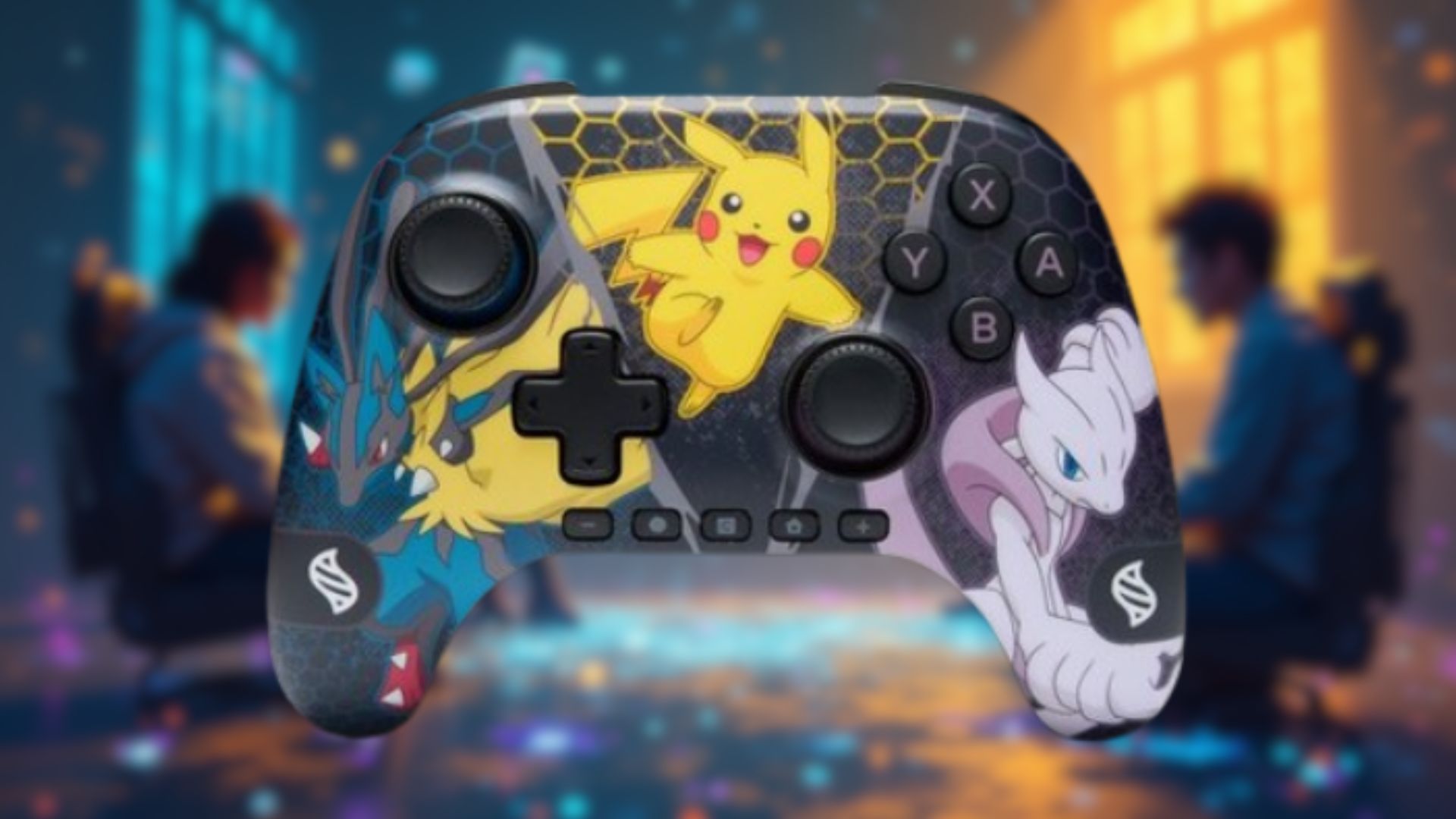

On paper, the PowerA Advantage Wireless Controllers for the Nintendo Switch 2 seem like a more affordable way to enjoy the premium nuances of an official Nintendo Switch 2 Pro Controller. PowerA has always excelled at delivering classy imitators, all while adding its own signature flair through creative designs and licensed crossovers.
When I was asked to check out PowerA’s Advantage Wireless Controller lineup of Switch 2 Pro controllers, it was a no-brainer. Nintendo‘s official accessories have always been notoriously expensive—it costs $89.99 for another set of Joy-Con 2 controllers, for example! If you’re worried about investing a lot of money into a third-party accessory or peripheral device, I’m here to tell you that your doubts are in vain. Read on for my full Advantage Wireless Controller Switch 2 Controller review.
Pro-kemon, Gotta Catch ‘Em All!

From the box to the packaging to the controller itself, this feels like a premium product. The PowerA Advantage Wireless Controller is ‘Pro’ in every sense of the word. I reviewed the Pokémon: Mega Evolutions edition, but the range also features a more classic-looking ‘Black‘ design, in line with the actual Switch 2 Pro controller, and the more vibrant ‘Mario & Friends‘ is a must-have for Mario fans.
As a Pokémon connoisseur myself, I had to have Mega Evolutions. It’s simply incredible to look at. The front-facing design is compartmentalized into Lucario, Pikachu, and Mewtwo segments. They team up and intertwine to create a canvas of cohesive colors, and they’re presented on, in essence, a smooth-shaven controller surface—It’s the ASMR equivalent of sleek architecture.
The main Y, X, A, and B buttons have a nice purple finish to align with Mewtwo’s colors, and the top of the device—where a centrally-placed USB-C slot awaits—has a lovely yellow finish wrapped around the curved edges. The analog sticks are where your thumbs will be the majority of the time. A stark opposite to the Pro controller is having grippy barbs around each rubber stick. They add an extra layer of grip, and give you a feel of control that its more expensive contemporary could learn a thing or two from.
Lightweight is the best way to describe the controller, and it sits beautifully in my hands. The buttons are clicky and responsive, and my only real reservation about the design is that the controller’s main functionality buttons are all in a line along the bottom of the controller. I don’t think PowerA has done this with previous Switch controller designs. Throughout my playtime with the device, I often found myself trying to press the ‘+’ button, thinking it was in the middle of the controller, only to be met with empty space. Again, it’s the only minor inconvenience I’ve encountered with the design and presentation, and you get used to it after a while.
Pro Performance Across The Board

The PowerA Advantage Wireless Switch 2 Controller will cost you $69.99, compared to the more eye-watering $84.99 of the official Nintendo Switch 2 Pro Controller. After countless hours with the Pokémon: Mega Evolutions controller, I don’t see any reason to pay the extra $15. Plus, you don’t get the novelty and variety of these bespoke designs.
In fact, the only major performance discrepancy of note is the battery life: You get roughly 40 hours for the official controller versus 30 hours with the PowerA model. It’s up to you if you think the extra money is worth a few more hours, but I charge my controller regularly, and I have immediate access to a USB-C cable next to the couch as a contingency for worst-case scenarios.
PowerA has also thrown in a 10ft / 3m USB-C charging cable as a bonus.
I tested the controller across a collection of my Switch games: Mario Kart World, Pokémon Scarlet, and Super Mario Party Jamboree. I experienced zero issues; the controller connected to my Switch 2 very quickly, and it behaves just like a Pro controller should. It also doesn’t skimp on the additional buttons, enabling you to reconfigure the controls. If you feel the X button is too far away for the game you’re playing and it’s compromising your playstyle, simply remap it to either of the GR/GL buttons.
The GR and GL buttons are present on the controller’s rear area of the handles, tucked inside. They sync up with your middle fingers and give you the liberty to tweak your setup. It also has real-time sensors and motion controls as standard—along with a C Button for Switch 2 GameChat.
Verdict
Unless another pro controller comes along that narrowly edges out the Pokémon: Mega Evolutions design, this is easily my new, full-time Nintendo Switch 2 controller moving forward. The analog sticks are unbelievably satisfying to use and tailor-made to cushion your thumbs. The overall design is smooth, simple, light, and feels satisfying to use. The controller’s performance is absolutely what it needs to be, and unless you want to pay a few more dollars for additional battery life, you can’t go wrong with any of the PowerA Advantage Wireless Controllers For Nintendo Switch 2.
I hope you enjoyed my Advantage Wireless Controller For Nintendo Switch 2 review. Let me know if you end up buying one of the controllers. You can tell me, and IG as a whole, through the Insider Gaming Discord.
Our tech reviews don’t stop there. See what we thought of the Woojer Strap 4, the ASUS ROG Xbox Ally X, the Astro A20 X Wireless Headset, and the GameSir G7 Pro Controller.

Andy is Insider Gaming's Senior Evergreen Editor and has been in the games journalism sphere in one way or another for over 7 years. His video game taste is as…
More from Andrew Highton
