






The Battlefield 6 Open Beta is back for another weekend, the final opportunity to enjoy the game before launch, and there is a slew of rewards available. To make sure you don’t miss out, we’ve got the details on them all.
Battlefield 6 is certainly making waves, with data suggesting over 500k pre-orders on Steam alone and a peak of concurrent players on Steam during the first weekend of the Open Beta hitting half a million players. Clearly, the assessment that Battlefield is back is spot on.
With Battlefield 6 set to be one of the biggest games of the year, why not ensure you’ve secured some exclusive rewards for launch? We’ve got details on everything that’s available to make things easier for you.
All Battlefield 6 Open Beta Rewards
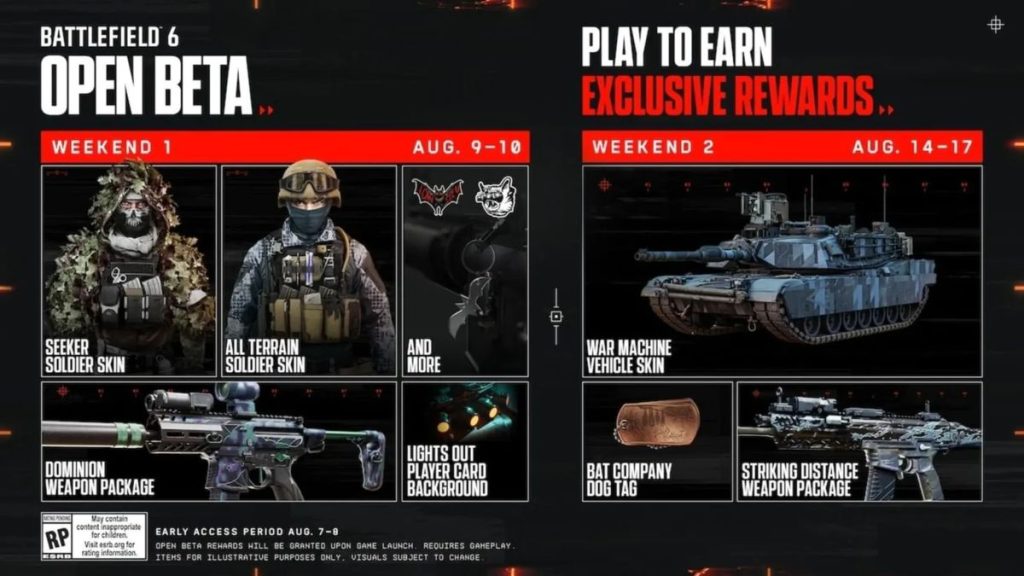
Rewards in the Battlefield 6 Open Beta are split into three forms—completing challenges in game, via Twitch Drops, or as part of a large community goal.
Most of the rewards are available through in-game challenges, requiring you to reach certain levels, achieve objectives as a specific class, and complete game-related tasks. These can take a heavy amount of grinding, however, given the large numbers that are required, like securing 200 kills.
Similarly, the Twitch Drop rewards also require sinking in a hefty amount of time. To unlock all the available Twitch Drop rewards, four hours of the Battlefield 6 Open Beta must be watched on Twitch. Fortunately, if you’ve already started digesting content on the platform, it includes the initial Open Beta weekend.
Finally, a huge community challenge has been set by the devs to dish out $1bn worth of destruction damage. If that goal is met, those who participated will earn an exclusive skin for the full release of the game.
The table below shows all the Battlefield 6 Open Beta rewards available, alongside details on how to unlock them.
| Reward | How to Unlock |
|---|---|
| Lights Out Player Card | Reach Level 10 |
| Rising Star Character Skin | Reach Level 15 |
| Night Terror Weapon Charm | Reach Level 20 |
| Striking Distance Weapon Package | Playing as Assault, get 50 closer-quarter kills. |
| Own The Night Weapon Sticker | Playing as Support, revive 100 teammates. |
| After Dark Weapon Sticker | Playing as Engineer, repair a total of 3,000 vehicle HP. |
| Seeker Character Skin | Playing as Recon, spot 300 enemies. |
| War Machine Vehicle Skin | Capture 42 flags in Conquest, Domination, or King of the Hill. |
| Bat Company Dog Tag | Get 200 kills or assists. |
| Dominion Weapon Package | Capture 10 Sectors in Breakthrough or Rush. |
| Mimic Weapons Package | Watch 1 Hour on Twitch |
| Landslide Soldier Skin | Watch 2 Hours on Twitch |
| Shattered Vehicle Skin | Watch 3 Hours on Twitch |
| Imperial Soldier Skin | Watch 4 Hours on Twitch |
| M60 Weapon Destruction Skin | Destruction Community Goal |
| Advance Party Soldier Skin | PlayStation Exclusive – Play the Beta |
How hyped are you for the release of Battlefield 6 after playing the Open Beta? Let us know in the Insider Gaming forum.
For more Battlefield 6, check out how to view your Open Beta stats, and take a look at the tease of additional large maps coming for launch.



