






Warzone is free, meaning any PlayStation 5 user can install the battle royale and experience everything Verdansk has to offer.
Purchasing Black Ops 6 or any previous Call of Duty title is not required to access Warzone. If you are returning or downloading for the first time, it’s the perfect time to get into the battle royale. Raven Software released a new and improved version of Warzone’s original map, Verdansk.
In addition, the massive update cracked down on cheating, made several community-requested quality-of-life changes, shook up the game’s meta, and re-introduced several iconic weapons, including the Kilo 141 and HDR. If that was enough to lure you in, here is everything you need to know about downloading Warzone.
How to Download Warzone For Free on PS5
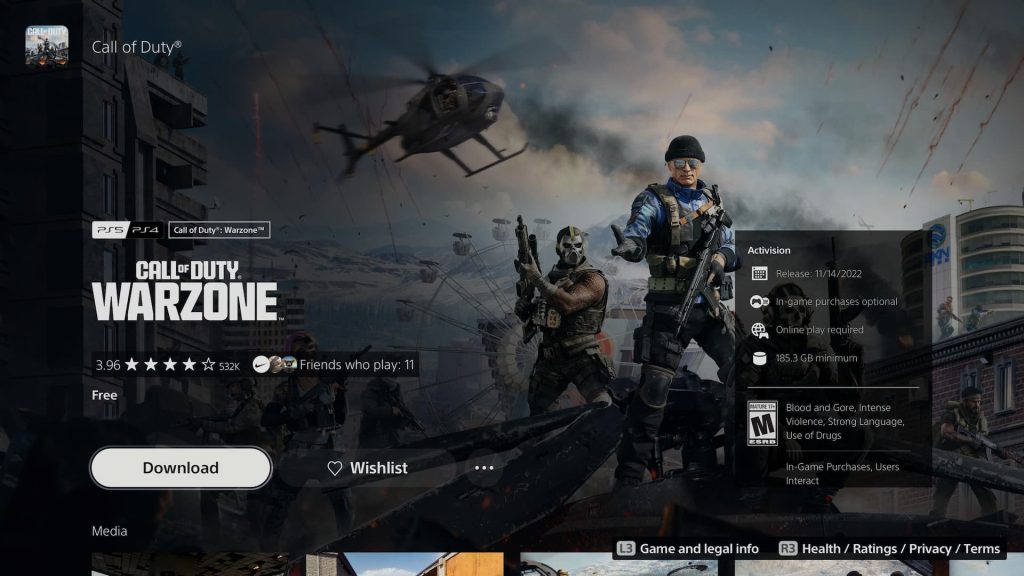
To download Warzone on PS5, go to the PlayStation Store, use the search tool to locate Warzone, and then complete the process by selecting the game and starting the download process.
Here are the steps to download Warzone.
- From the PS5 Home screen, scroll over and select the PlayStation Store.
- Go up to the magnifying glass in the top right corner and click it.
- Type in Warzone and select Call of Duty.
- Press download.
- From there, you can select which files you want to download.
Warzone PS5 Download Size
Warzone requires a minimum of 185.3 gigabytes free to download the game. Despite Activision’s efforts to reduce Call of Duty’s download size, you still need significant storage space to download Warzone. So, before you follow the steps above, ensure you have enough space first.
If you need to clear more space, follow these simple steps.
- From the PS5 Home screen, click the settings cog in the top right of the screen.
- Scroll down and select Storage.
- Press Console Storage.
- Select Games and Apps.
- From there, you can see how much storage each game takes and how much console storage you have left.
- Select a game and press Delete at the bottom right to clear space.
Deleting a game does not mean you lose it forever. All owned games can be re-installed anytime in your Game Library, found on the PS5 Home screen.
Now that you know how to install Warzone, check out our guides on equipment items you should focus on unlocking first, such as the Thermite Lethal and Monolithic Suppressor. And if you need somewhere to hone your craft, check out Warzone Casual.
How many of your favorite games did you have to delete to clear space for Warzone? And don’t forget to check out the Insider Gaming Forums if you have any insight or feedback about the most recent Call of Duty update.



